The Filters
The Filters choose and describe the readings for every tab. Different structure types and different domains should be analysed separately: mixing them blurs the pattern.
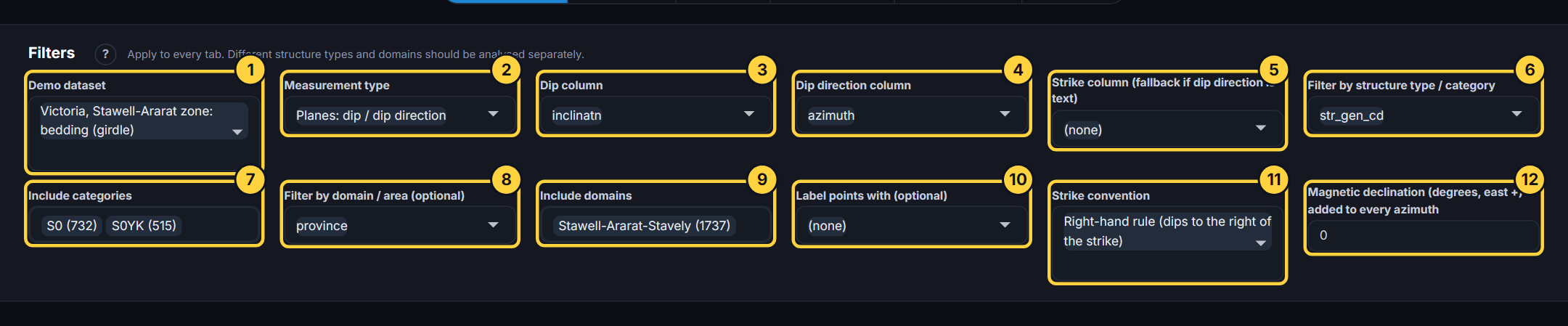
- Demo dataset: Which dataset. With Upload this is the file box.
- Measurement type: What the readings are. Changing it re-matches the columns.
- Dip column: The column holding the first angle (for planes, the dip). Its name changes with the measurement type.
- Dip direction column: The second angle (for planes, the dip direction as an azimuth).
- Strike column: Used only when the dip direction column is text (for example NE); the strike and the dip then give the direction.
- Filter by structure type: A column that says what each reading is: bedding, joint, fault. Choose it, then tick the types below.
- Include categories: The structure types to analyse, with how many readings each has. Take one at a time for a clean pattern.
- Filter by domain: Optional: a column that says where each reading is from (a fault block, a pit wall, a province).
- Include domains: The domains to include.
- Label points with: Optional: a column to show when you point at a reading, or to write beside points on the net.
- Strike convention: How strikes were recorded: the right-hand rule (dip to the right of the strike) or the left-hand rule. A wrong choice puts planes in the wrong place.
- Magnetic declination: Added to every azimuth, so readings taken against magnetic north can be shown against true or grid north. East is positive.